


A global infrastructure and construction organization
OHLA, Obrascón Huarte Lain, is a Spain-based group working across transport infrastructure, industrial plants, concessions, and real estate. Its BIM Management team uses the corporate project library to make model information and information requirements accessible to project stakeholders.
Make IFC accessible inside SharePoint
Project stakeholders needed to inspect and discuss IFC files without moving documents to another platform or requiring every participant to operate specialist desktop software.
The workflow also needed to preserve Microsoft permissions and support openBIM collaboration across project teams.
Embed model review in the existing project library
OHLA introduced Flinker IFC Viewer alongside SharePoint document libraries and Microsoft Teams. The same model can be opened from a library or presented within a SharePoint page, keeping geometry and properties close to the surrounding project documentation.
Models remain in SharePoint and viewing runs in the browser. Installation can be scoped to a SharePoint site to align the rollout with the organization's governance.
Deploy Flinker IFC Viewer through the Microsoft app catalog.
Select one or more IFC files in a SharePoint library and choose View.
Embed the IFC Viewer web part on a project or intranet page.
Add the viewer as a tab in a Teams project channel.
Inspect models with search, filters, isolation, clipping, measurements, and floor plans. Export selected properties to Excel when needed.
Show what information requirements mean in the model
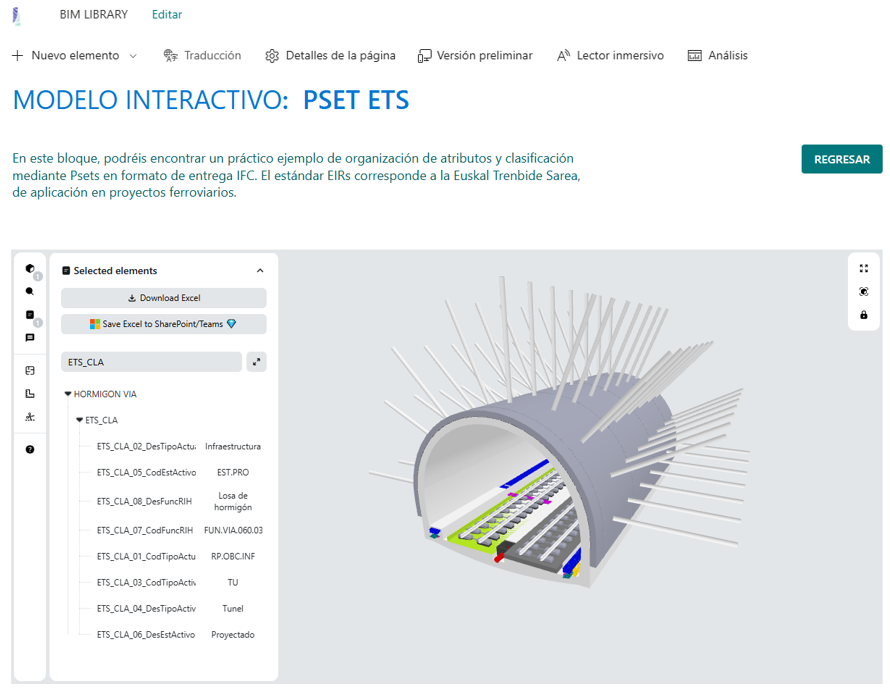
The corporate library connects a visual example with the information expected from project models. The embedded railway model shows property sets and classification values alongside the geometry.
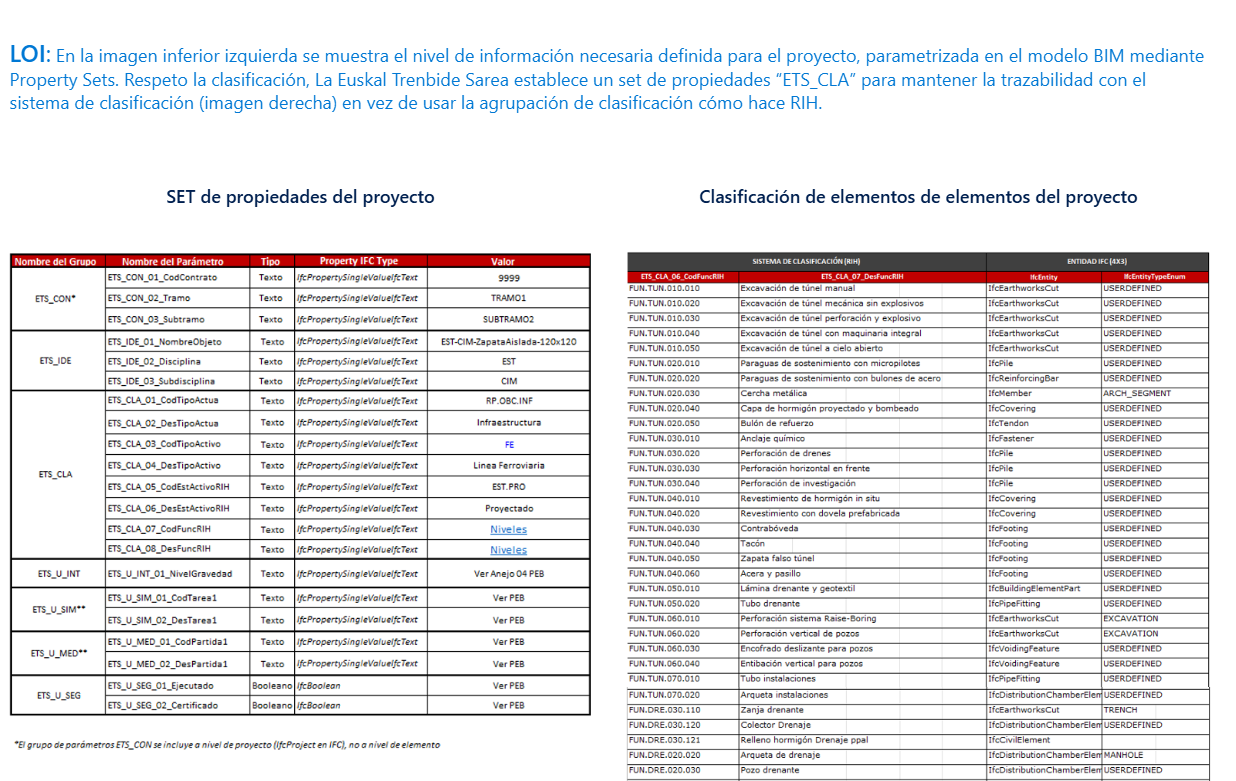
A companion reference explains project properties and the mapping between classification codes and IFC entities. This gives teams a concrete way to discuss level of information need (LOIN) requirements from public administrations.
A shared model library for wider collaboration
OHLA reports that IFC information is now available where its teams already work. The shared library supports communication and documentation between architects, engineers, and owners while retaining SharePoint as the project environment.
Teams review models without uploading the project files to a separate viewing platform. It also gives the BIM Support Office a practical way to demonstrate how model data supports public-sector information requirements.
Standardize the pattern across more teams
OHLA plans to expand the SharePoint viewer to more business units and standardize model review pages in the corporate intranet. Further plans include Teams tabs in additional project channels and selected-property connections to Excel and Power BI for portfolio reporting.
The aim is a searchable model library with consistent LOIN documentation across projects.